Every field, found for you
Fillable boxes are highlighted the moment the file opens. Tab walks through them in order. On a PDF with no fields at all, click anywhere and type.
 PDFPane
Chrome extension
PDFPane opens the PDF on your own computer. Type into forms — or onto any page — sign it, rearrange the pages, and download it. The file never leaves your machine.
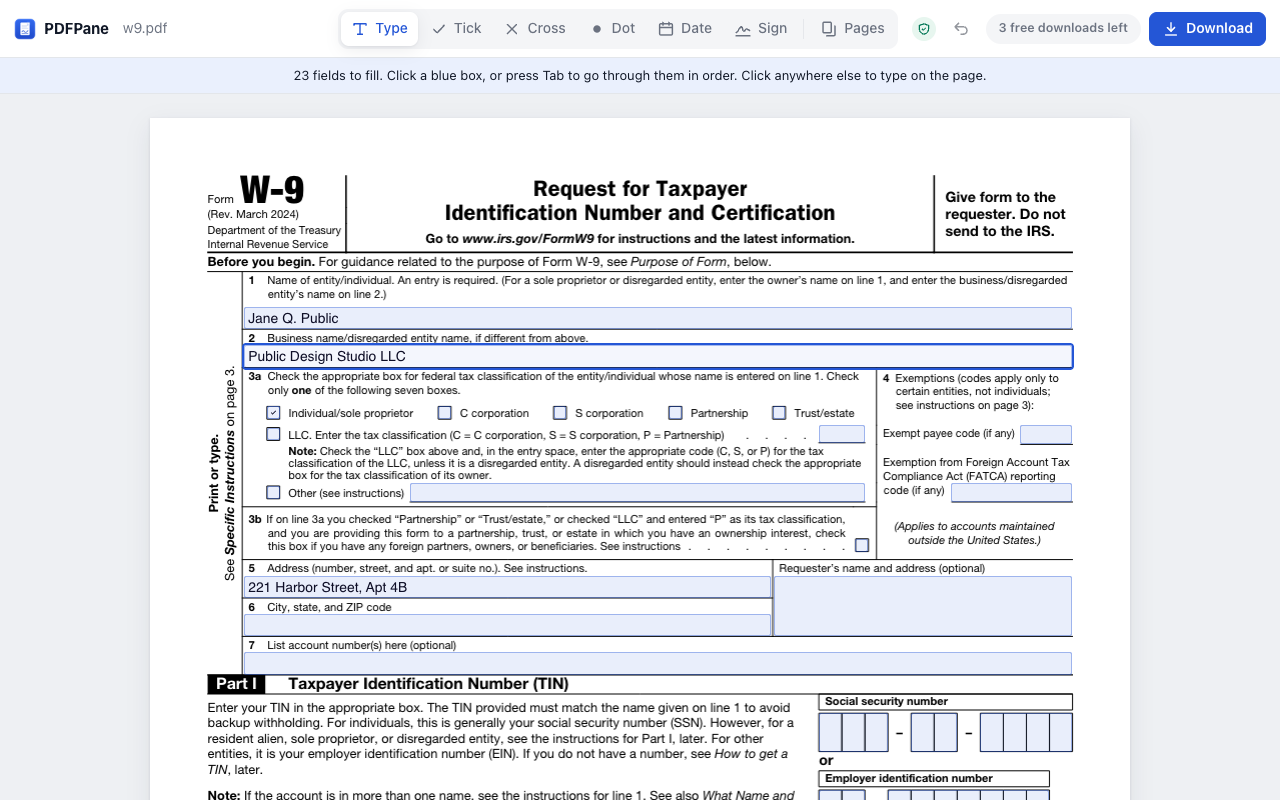
Fillable boxes are highlighted the moment the file opens. Tab walks through them in order. On a PDF with no fields at all, click anywhere and type.
Draw with a mouse or a finger, type your name in a handwriting font, or use a photo of your signature — the white paper is removed. Saved on this computer for next time.
Turn, remove and drag pages; add another PDF; download just the pages you pick. Forms keep working after a merge.
No account, no upload, no tracking. The free version makes no network connection at all, so there is nothing to intercept and nothing to leak.
Not after an hour of filling. Opening, filling, signing and arranging pages are always free; only downloads are counted.
$0
$19 once
Yes. PDFPane runs entirely inside your browser, and the free version does not connect to the internet at all. You can check: open it, switch Wi-Fi off, and it still works.
Yes. Click anywhere on the page to type, tick or cross boxes, add the date, and place your signature.
Type the password and the file opens — the password is checked on your computer. When you download, you choose whether the copy keeps the same password.
Latin, Cyrillic and Greek, with accents — including in form fields, where many tools print blanks.
With cryptocurrency, through NOWPayments. Your licence key appears as soon as the payment is confirmed and switches PDFPane to Unlimited by itself.